
ServiceNow Certified System Administrator

The ServiceNow Certified System Administrator exam is designed for professionals who configure, implement, and maintain a ServiceNow instance. It is the foundation credential for the platform and the entry point to most ServiceNow career paths, including application development, implementation specialist tracks, and the expert programs. A Certified System Administrator is responsible for keeping an instance secure, well structured, and aligned to how the business actually works, from user access and data quality through to service delivery and automation.
The certification suits support specialists, application analysts, system engineers, technical consultants, and IT administrators who already work on the platform or want to move into a ServiceNow role. This guide is intended to prepare candidates for the exam and covers the core topics in scope.
Key facts
This information will assist you if you’re interested in becoming Certified System Administrator and includes an overview of the core topics in the exam.
There are 6 domains of knowledge that are covered by the ServiceNow Certified System Administrator certification.
| Exam Domain | Weighting |
|---|---|
| Platform Overview and Navigation | 7% |
| Instance Configuration | 10% |
| Configuring Applications for Collaboration | 20% |
| Self Service & Automation | 20% |
| Database Management and Platform Security | 30% |
| Data Migration and Integration | 13% |
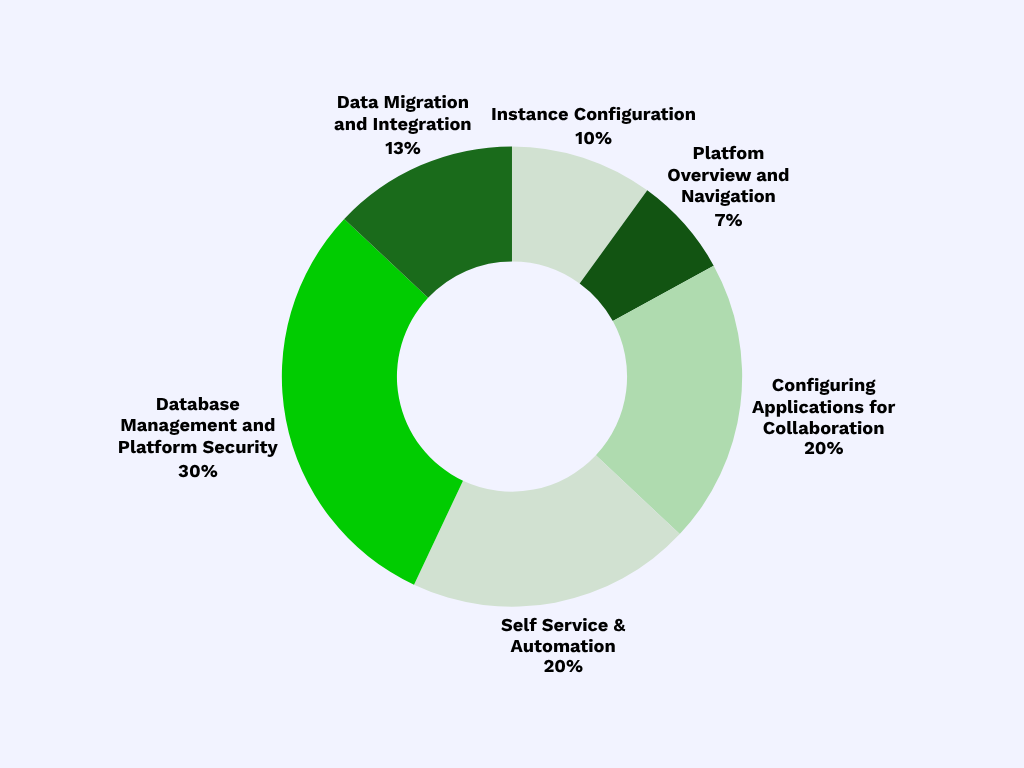
ServiceNow Certified System Administrator weighting chart
ServiceNow Certified System Administrator certification contents
The following are the 6 core topic areas of the System Administrator certification and what you’re expected to know. The listed sub-topics should NOT be considered an all-inclusive list of the exam content.
Platform Overview and Navigation
This domain includes the following sub-topics:
ServiceNow Platform overview
ServiceNow is a cloud platform simplifying digital workflows across IT, employee, and customer operations. It features a unified data model, shared architecture, and tools like Flow Designer and Integration Hub. With a modern UI, mobile access, and role-based security, it supports scalable applications like ITSM and HR, offering a unified system of record and automation for efficient enterprise service management.
Platform capabilities and services
ServiceNow uses persona types (end users, agents, administrators) to categorize users based on access needs. Users, individual records of people or systems, are managed in groups. Roles define specific permissions and are assigned to users directly or via group membership, enforcing access control. Impersonation allows admins to temporarily act as other users for testing or troubleshooting.
The ServiceNow Instance
A ServiceNow instance is a single, unique platform deployment with its own URL, configuration, data, and applications, each serving a distinct purpose within a landscape. ServiceNow provides two annual upgrades with new features and fixes. Free Personal Developer Instances (PDIs) are available for testing and development.
Next Experience Unified Navigation
ServiceNow offers a unified platform for end-to-end digital transformation, automating and optimizing processes across departments to deliver seamless digital workflows. It securely shares structured data organization-wide, preventing redundancy.
Instance Configuration
This domain includes the following sub-topics:
Installing applications and plugins
Plugins and applications both extend ServiceNow functionality but differ in purpose. Plugins enable core features like Incident Management, while applications are broader, often custom-built solutions for specific business needs. Both are installed via the System Applications module, and understanding their distinction aids effective tool deployment.
Personalizing/customizing the instance
Personalizing a ServiceNow instance tailors the platform to an organization’s branding, workflows, and user preferences. This includes updating visual elements (logo, colors, browser tab titles) and configuring system properties to control functionality. Customization enhances user experience, reinforces corporate identity, and supports efficient navigation and usability, making ServiceNow a seamless extension of operations..
Common user interfaces in the Platform
Users interact with the ServiceNow platform through various interfaces: Now Platform UI (forms, lists, dashboards), Service Portal (self-service), mobile apps, and Virtual Agent (chat). Developers and admins use Flow Designer, ServiceNow Studio, and scripting for application development and automation. Each interface is tailored to specific roles, offering adapted features.
Configuring Applications for Collaboration
This domain includes the following sub-topics:
Lists, Filters, and Tags.
Lists, filters, and tags are crucial for data management in ServiceNow. Lists show multiple records, filters narrow results, and tags group records, all enabling efficient data navigation and organization.
List and Form anatomy
Lists present multiple records from a table in a spreadsheet-like format, enabling bulk data interaction. Forms display single records for detailed viewing or editing. Both link directly to database tables, with fields and columns mirroring table structures. UI enhancements like form sections and related lists streamline navigation and workflow automation within ServiceNow.
Form Configuration
ServiceNow form configuration customizes data display and interaction on record forms for usability, business rules, and workflows. Administrators use tools like Form Designer, Form Layout, and Form Builder to modify layouts, control field behavior, and create tailored views, ensuring relevant information, efficient data interaction, and consistent process enforcement.
Form templates and saving options
Form templates and flexible saving options like Save, Submit, or Update streamline data entry and ensure consistency in ServiceNow. Templates allow predefined values for quick, accurate form population, either user-specific or shared for standardization. These features boost efficiency and improve the user experience.
Advanced Form Configuration
Choice lists offer dropdown menus with predefined values, while reference fields link to other tables, storing the referenced record’s Sys ID. Both standardize data entry and support relational data.
Task Management
ServiceNow’s Task Management, built on the core Task [task] table, efficiently tracks, assigns, and manages work. This foundational table extends to process-specific tables like Incident and Problem, ensuring consistent yet flexible task handling. Essential features include assignment, prioritization, state tracking, SLA enforcement, and automated notifications, crucial for responsive service operations.
Visual Task Boards (VTBs)
ServiceNow’s visual task dashboards offer a dynamic, intuitive way to monitor, manage, and prioritize work. Using real-time data visualizations like charts and Kanban boards, they provide immediate insight into task statuses, workloads, and performance. By centralizing information visually, these dashboards boost productivity, improve decision-making, and facilitate proactive issue resolution across IT, HR, and customer support, streamlining operations and aligning with business goals.
Visualizations, Dashboards, and Platform Analytics
ServiceNow’s Platform Analytics provides real-time insights via performance analytics, reporting, and visualizations. It helps users track KPIs, identify trends, and make data-driven decisions using built-in tools, customizable interactive dashboards, and intuitive visualizations for various roles and departments.
Notifications
Email notifications automate communication by informing users about platform events. Triggered by specific conditions like record changes, they send dynamic content to users, groups, or external recipients, improving workflow, transparency, and decision-making.
Self Service & Automation
This domain includes the following sub-topics:
Knowledge Management
ServiceNow Knowledge Management centralizes information for efficient sharing, troubleshooting, and self-service. It streamlines content creation and publishing, improving productivity, service delivery, and empowering users with quality-controlled, relevant information.
Service Catalog
ServiceNow’s Service Catalog is a central digital storefront for IT and business services. It allows users to browse, request, and track services like hardware, software, and access, improving user experience and operational efficiency. Integrated with workflows, approvals, and SLAs, it ensures timely and accurate service delivery.
Workflow Studio
Flow Designer in ServiceNow is a modern, low-code automation tool that enables users to create, manage, and visualize flows that automate processes across the platform. It provides a user-friendly, drag-and-drop interface where flows are built using triggers, actions, and data inputs without the need for scripting. Flow Designer is the preferred automation tool in newer ServiceNow implementations, replacing the older Workflow Editor for most use cases.
Virtual Agent
ServiceNow’s Virtual Agent is an AI chatbot that automates tasks and provides instant support via natural language conversations. Integrated within the ServiceNow platform, it allows users to interact with IT, HR, and customer support services without human intervention. Using predefined flows, machine learning, and system integrations, it resolves issues, answers queries, and streamlines workflows, enhancing user experience, reducing service desk workload, and improving response times.
Database Management and Platform Security
This domain includes the following sub-topics:
Data Schema
A data schema organizes platform data using tables, fields, and relationships for business entities like incidents and users. Tables store records with defined fields and inherit hierarchically, often from Task or CMDB tables. ServiceNow’s schema is extensible, allowing custom or extended tables while maintaining data integrity. Tools like the Schema Map and Table & Column module visualize and manage these relationships for efficient application design.
Application/Access Control
ServiceNow application and access control is key for secure and efficient platform use. It manages who accesses applications, modules, and data via roles, permissions, and access rules. This enforces data security, regulatory compliance, and tailored user experiences, preventing unauthorized access while enabling effective job functions within defined scopes.
Importing Data
Importing data into ServiceNow involves bringing information from external sources into the platform for storage and management. This process is crucial for populating tables during initial setup, integrations, or ongoing maintenance. It typically includes staging data in a Load Data table, defining Transform Maps for field mapping, and applying Transform Scripts for business logic. A thorough understanding of the import process, from data sources to post-import verification, is essential for accurate, consistent, and secure data migration.
CMDB and CSDM
The ServiceNow CMDB centralizes IT infrastructure data (servers, applications, services, and their relationships) to clarify assets and change impacts. The CSDM builds on this by standardizing data organization to align with business and service management, ensuring data is properly structured for processes like incident, change, and service mapping. While CMDB is the “what and where,” CSDM is the “how and why” for effective data utilization.
Security Center
ServiceNow Security Center unifies and centralizes enterprise security management within the ServiceNow ecosystem. It provides real-time visibility by integrating data from various security tools. The platform offers continuous risk assessment, automated incident response, and compliance tracking, aligning security operations with business objectives by prioritizing threats. This helps reduce risk, improve collaboration, and streamline workflows through automation and AI.
Shared Responsibility Model
The ServiceNow Shared Responsibility Model clarifies security and operational duties between ServiceNow (provider) and customers. ServiceNow secures infrastructure and core services, while customers manage instance configuration, access controls, and data. This model is vital for compliance, risk reduction, and effective platform use.
Data Migration and Integration
This domain includes the following sub-topics:
UI Policies
ServiceNow UI Policies are client-side rules that dynamically control field behavior and visibility on forms. They enable administrators to show, hide, enable, disable, or make fields mandatory without scripting, improving data accuracy and user experience. For example, a UI Policy can make the “Impact” field mandatory when “High” priority is selected.
Business Rules
Business Rules are server-side scripts that run when records are inserted, updated, deleted, queried, or displayed in a table. They enforce data consistency, automate processes, and apply logic without user interaction. Unlike client-side UI Policies or Client Scripts, Business Rules operate on the server, ensuring rules apply regardless of how a record is changed (form, import, integration, API).
System update sets
Update Sets capture and migrate ServiceNow configuration changes (e.g., new fields, workflows, UI changes) between instances. They ensure synchronized instances, minimize manual errors, and provide a reliable process for managing platform enhancements.
Scripting in ServiceNow
ServiceNow scripting uses JavaScript (client-side: Client Scripts, UI Policies, UI Actions; server-side: Business Rules, Script Includes, Scheduled Jobs) to customize and extend the platform. It enables automation, enforces business logic, creates seamless user experiences, tailors workflows, integrates with external systems, and implements complex functionality beyond standard configurations, forming the core of scalable, efficient, and intelligent ServiceNow solutions.
To prepare successfully for the certification exam, we recommend using our ServiceNow Certified System Administrator (CSA) Exam Kit: the complete ServiceNow CSA prep bundle includes the official exam voucher, 120-question practice exams and expert guidance with Study Support Plus, all for about the cost of the exam alone.